


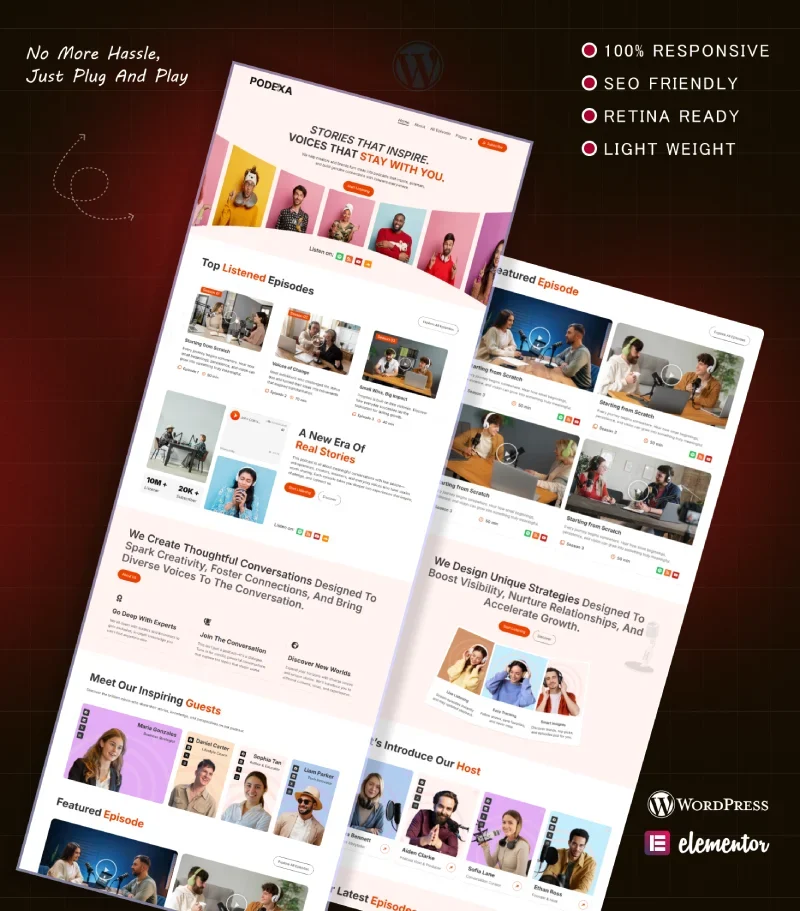
Podexa is a podcast Elementor template kit for WordPress, built for interview shows, video podcasts and creators who publish on YouTube, Spotify and other apps. It comes with 11 ready pages, including All Episode, Single Episode, Host, Guest and Single Guest.
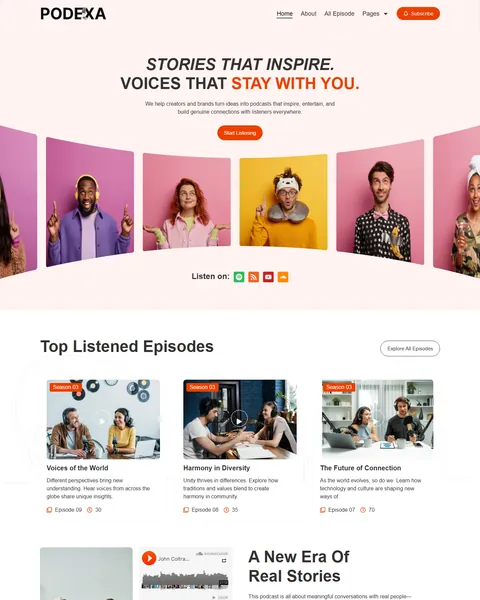
The demo opens with a moving 3D photo slider under a bold “Stories That Inspire” headline, and visitors can play episode videos right on the page. Bright orange-red buttons on a soft blush background give your show an energetic, modern look.
Podexa is built with Elementor and Elementor Pro, along with the free ElementsKit Lite and Marquee Addons for Elementor. You bring the Pro license, and our team installs the rest for free.
Quick Template Details
- Template Name: Podexa
- Required Theme: Hello Elementor (Free)
- Elementor Pro Required: Yes
- Premium Plugins Required: Elementor Pro only
- Page Templates: 11
- Forms: Elementor Form widget
- Responsive: Desktop, Tablet, Mobile
- Coding Required: No
Who Is This Podcast Website Template For?
- Interview and conversation podcasts. Guest profiles, a guest card on every episode page and a “become the next guest” invitation are already built in.
- Video podcasts published on YouTube. Episode cards play YouTube videos inline, with your own cover image on top.
- Shows with several hosts or seasons. The Host page introduces four hosts, and the All Episode page groups episodes by season.
- Creators and brands that produce podcasts. The hero copy speaks to brands, and the Contact page lists a separate email for collaborations.
Need Pricing and FAQ pages for memberships or sponsor packages? Our Podinflu audio podcast Elementor template kit includes both.
See Every Page in the Podexa Podcast Template
Here are all 11 pages. Open any of them in the live demo with one click.
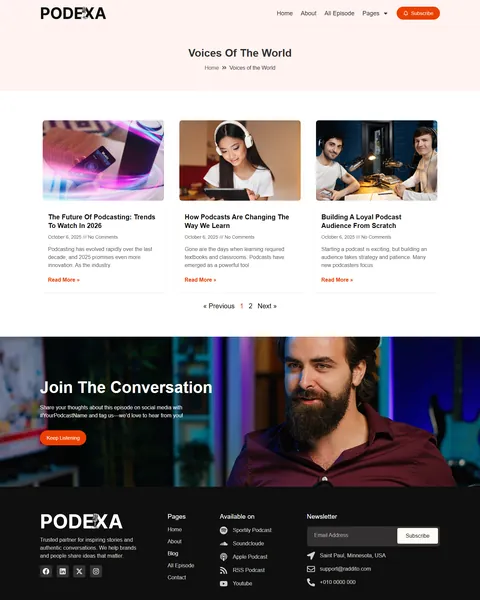
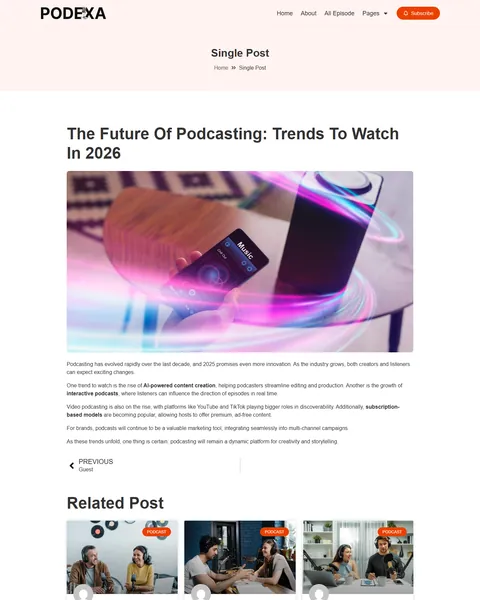
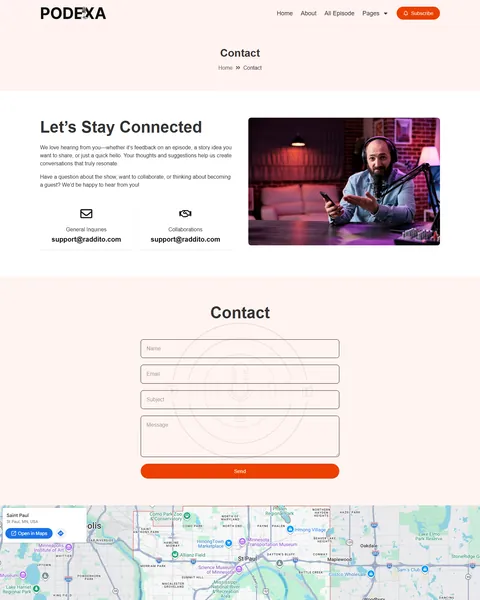
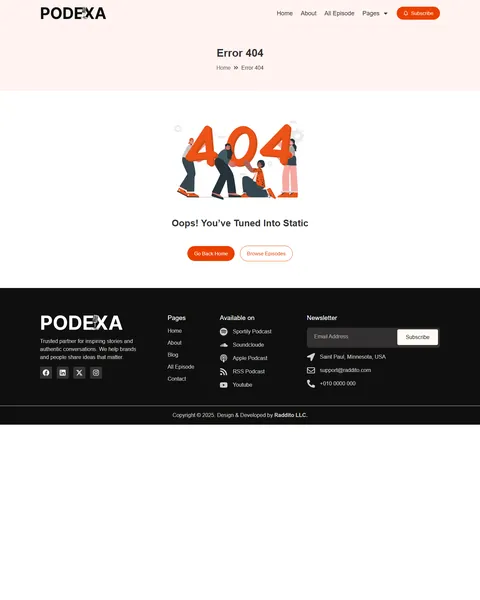
Episodes That Play Right on Your Site
Most people want to hear a sample before they hit subscribe. Podexa lets them press play without leaving your website. Episode cards on the homepage embed YouTube videos behind your own cover image, and each card shows the episode number, season and running time.
Under the hero and beside the featured episodes, small icons link to Spotify, RSS, YouTube and SoundCloud, and the footer adds Apple Podcasts. Listeners can pick the app they already use, while your website stays the one home base for every platform.
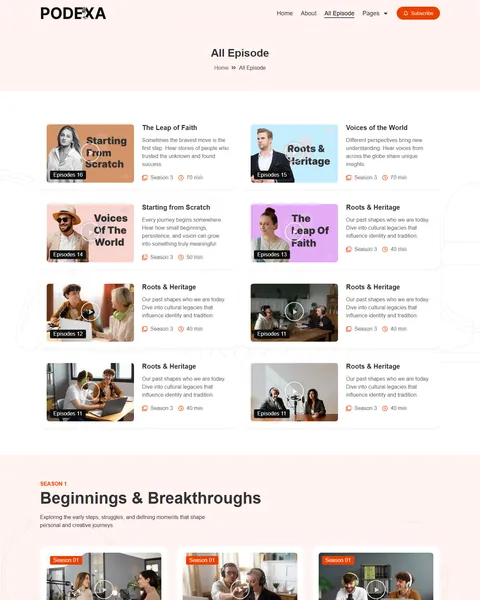
An Episode Archive Organized by Season
The All Episode page opens with your latest releases, then groups older ones by season. In the demo, Season 1 is “Beginnings & Breakthroughs”, Season 2 “Beyond the Comfort Zone” and Season 3 “Connections & Cultures”, each with a short theme description. New listeners can start from the first episode or jump to the theme that interests them.
Behind the scenes, each demo episode is a regular WordPress post shown through a single-post template made with the theme builder. Publishing a new episode works like writing a new post, and the homepage episode grids use the Loop Grid widget, so fresh episodes appear there on their own.
Single Episode Pages Built for Show Notes
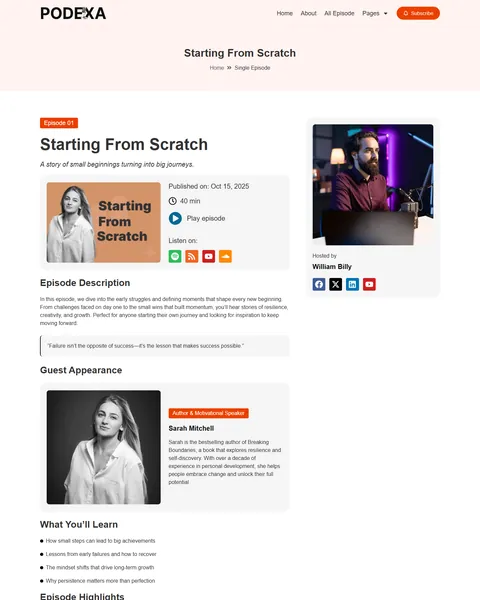
Every episode gets a full show-notes page. It starts with the title, a one-line hook, the publish date, the running time, a play button and links to each listening app. A written description and a pull quote follow.
Then come the parts listeners find most useful: a guest card with photo and bio, and a “What You’ll Learn” list. Episode Highlights add timestamps, so people can jump to the moment at 07:40 where the guest talks about early struggles. A “Hosted by” box and a closing “Join the Conversation” band ask people to share the episode with your hashtag. Written show notes like these also give search engines text to read, which helps each episode get found.
Host and Guest Pages for Interview Shows
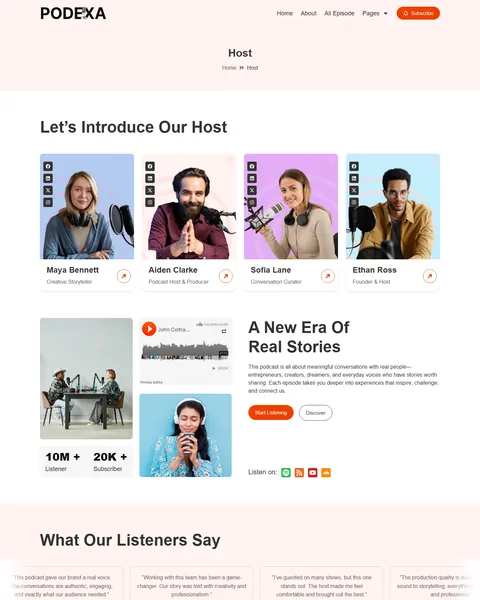
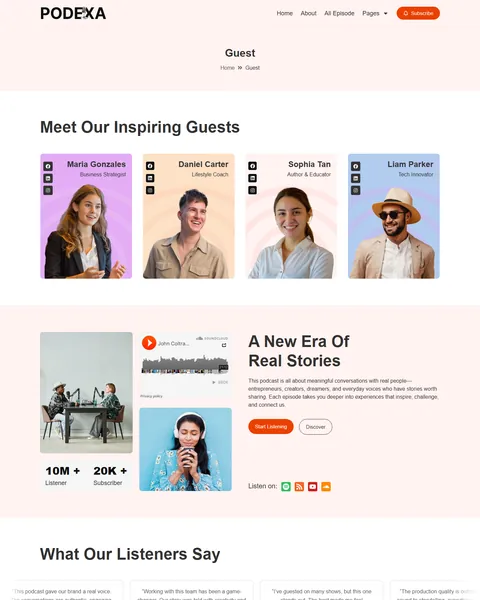
On an interview show, the people are the product. The Host page presents four hosts with roles like Founder & Host and Podcast Host & Producer, each with social links. The Guest page shows four guests, from a business strategist to a tech innovator.
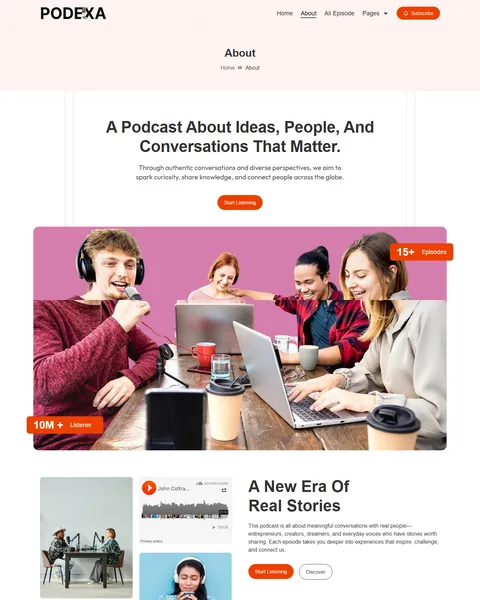
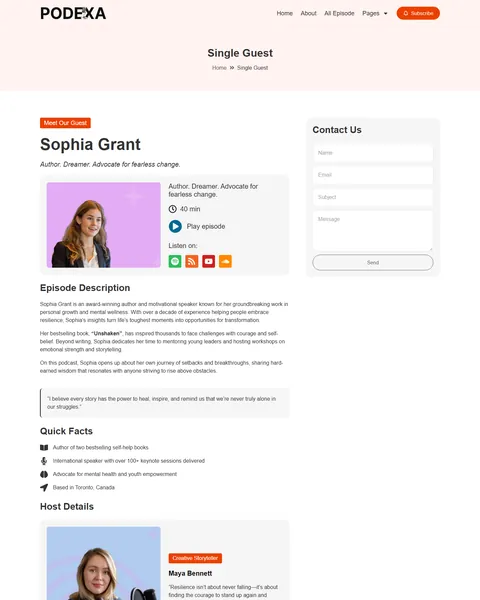
A Single Guest page goes deeper, with a bio, a favorite quote, Quick Facts, the host who led the interview, episode highlights and a contact form. On the About page, a “Want to Become the Next Guest Host?” block sends would-be guests to your Contact page, so pitches land in your inbox.
Tools to Grow Your Audience and Sponsors
A Subscribe button sits in the header on every page. An email signup in the footer helps you build a list you own, instead of depending only on podcast apps. Counters show 10M+ listeners and 20K+ subscribers, ready for your own numbers.
Reviews from fans, guests and brand partners scroll past in a continuous moving strip. The Contact page has separate emails for general questions and collaborations, so sponsors know where to write. A blog with related posts gives you space for articles and news between episodes.
Research-Driven Design for Podcasters & Creator Shows
We looked at how people try a new podcast. Most find a show through a clip or a friend’s tip and decide in seconds whether it feels like their kind of show. They also want to start listening without signing up first. Podexa’s design is built for that quick first impression.
An “on air” orange-red. The accent color is a vivid orange-red, close to the recording light in a studio. It marks the Subscribe and Start Listening buttons, season labels and the key words in the headline. Soft blush backgrounds keep the page warm, while near-black text and a black footer keep it grounded.
Big, confident type. Podexa uses Inter everywhere. The hero headline is set in capitals at 48px, with the first line in italics and the phrase “Stay With You” in orange. Inter is a clean screen font, so episode titles and descriptions stay easy to scan in a grid.
Faces first. People choose a podcast for the voices behind it. Hosts and guests appear in front of bright pink, peach and blue backdrops, and episode covers show real studio moments at the microphone. The 3D slider in the hero adds motion, which suits a show that also lives on video.
Listening within one scroll. The homepage moves from the headline and listening links straight to the top episodes, then to your story, hosts, featured episodes, guests and reviews. A curious visitor can press play before reading a single paragraph.
Rounded, friendly shapes. Pill-shaped buttons and rounded episode cards feel relaxed and approachable, much like the tone of a good conversation podcast.
Light forms. The contact form asks for a name, email, subject and message. The newsletter signup needs only an email address.
Made for phones. Many people browse podcasts on their phone. On mobile, the menu folds into a toggle, the headline shrinks to fit and every section stacks with no sideways scrolling.
Free Installation for This Podcast Elementor Template Kit
We install Podexa on your WordPress site free of charge and set it up exactly like the demo. Podexa needs Elementor Pro, and we don’t provide paid plugins, so please have your Pro license ready before we begin.
The demo photos come from Envato and are not included. Uploading your episodes, adding your videos or podcast player and writing show notes are not part of the free installation. If you would like the whole site built for you, see our done-for-you website service.
How to Install the Podexa Podcast Template Kit
Want to do it on your own? This walkthrough shows how to import the kit and set up each page.
Podexa vs Other Podcast Elementor Template Kits
Comparing podcast templates? Here is how Podexa stands against other popular podcast kits online.
| Podexa | Other popular podcast kits online* | |
|---|---|---|
| Free installation | Yes, included | No, not listed on any of them |
| Single episode page | Yes, with timestamps and a guest card | Listed on 1 of 3 |
| Guest list and guest profile pages | Yes, both | Not listed on any of them |
| Episodes grouped by season | Yes | Not listed on any of them |
| Last updated | Recently updated | December 2025, or not listed |
Why podcasters choose Podexa:
- Made for interview shows. Guests, hosts and show notes each have their own page.
- Episodes play on your site. Video episodes run inside the page, with links to every listening app.
- Set up for you. Free installation once your Pro license is ready.
*We compared Podexa with three popular podcast Elementor template kits that appear on Google’s first page, sold on ThemeForest, Templately and an independent template shop. Details come from each product page on October 24, 2026. Prices and features may change.
More Podcast and Creator Templates by Raddito
Podexa is one of two podcast designs we make. If you need pricing pages, build with Bricks or also sell books, one of these may suit you better.
Podinflu – audio podcast Elementor template kit
Best for shows that sell memberships or sponsorships and need Pricing and FAQ pages.
12 pages · Needs Elementor Pro · Live Preview
Podinflu – podcast Bricks Builder template kit
Best for podcasters whose website runs on Bricks instead of Elementor.
12 pages · Built for Bricks Builder · Live Preview
Readbyte – author website Elementor template kit
Best for authors and speakers who want to sell their books from their own site.
10 pages · Works with Elementor Free · Live Preview
Looking for more? Browse our blog and podcast website templates or every WordPress Elementor template kit we sell.
Frequently Asked Questions
Is Podexa a WordPress theme?
No. Podexa is a podcast Elementor template kit, a set of ready pages you import into Elementor. It runs on the free Hello Elementor theme.
Does Podexa need Elementor Pro?
Yes. It uses Pro features such as the Loop Grid, the single-post template for episodes and the form widget. The other two plugins, ElementsKit Lite and Marquee Addons for Elementor, are free.
Can I play audio-only episodes instead of videos?
Yes. The demo cards use YouTube videos, but you can paste the embed player from your podcast host, such as Spotify or SoundCloud, into any episode page or card.
How do I add a new episode?
Create a new WordPress post, add your video or player, show notes and timestamps, and publish it. The single-post template gives it the episode layout, and the homepage grids pick it up automatically.
Does Podexa host my audio files or RSS feed?
No. Podexa is the website design. Keep hosting your episodes with your podcast host, and link the RSS and app icons to your show’s real listings.
Can guests apply to be on the show?
Yes. The “Become the Next Guest Host” block on the About page leads to the Contact page, where guests can send a pitch through the form.
Is the installation really free?
Yes. We install Podexa exactly like the demo at no cost once your Pro license is ready. Adding your own episodes and content is up to you, or our Done For You team can handle it.